Server-Side GTM Transformations: Enriching Events Before Forwarding
By Samarth Analytics · Published · Updated · Tag Management · 8 min read
Summary: Server-side GTM has evolved from a simple data relay into a powerful orchestration engine. By utilizing transformations, businesses can reshape event data on the fly-enriching Meta CAPI payloads with high-value user attributes, stripping PII before it reaches third-party partners, and merging in CRM data in real-time. This guide outlines the core patterns used in production environments and provides the logic framework for professional event enrichment.
Why transformations are the real power of sGTM
When server-side Google Tag Manager (sGTM) was first introduced, the primary value proposition was performance: moving pixels out of the browser to improve Core Web Vitals. However, in 2026, the strategic center of gravity has shifted. The real power of sGTM lies not in where the data is processed, but in how it is reshaped during its journey. This is the realm of server-side GTM transformations.
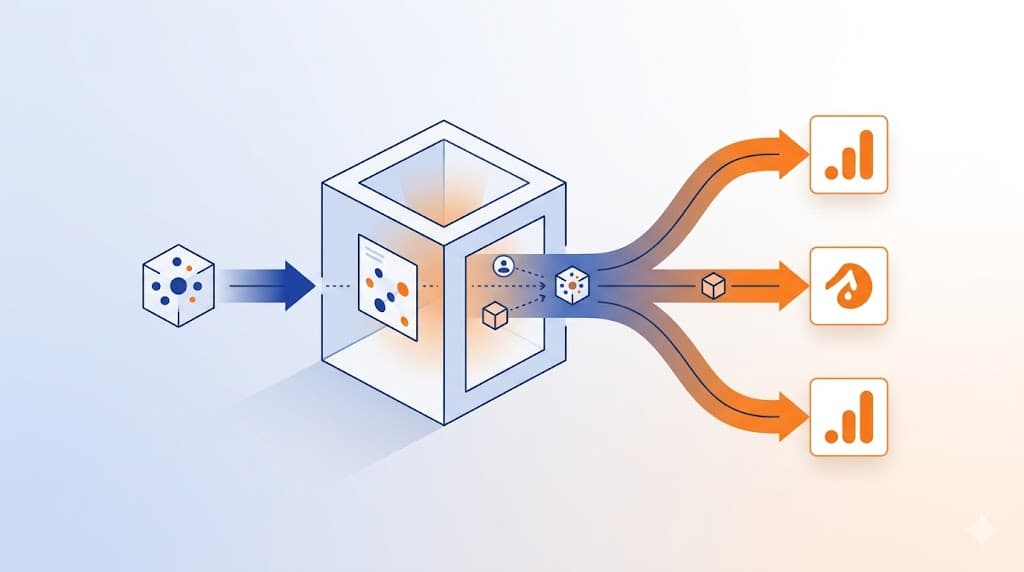
In a traditional client-side environment, once a tag is triggered, it essentially "scrapes" whatever is in the Data Layer and sends it to the vendor. You have very little control over the data packet once it leaves the browser. With sGTM, the server acts as an active interceptor. It can pause an event, look up additional information, modify the parameters, and then forward a "superior" version of that event to its destination.
This capability transforms your SST (Server-Side Tracking) into a data-cleansing and enrichment hub. It allows you to enforce a "Data Contract" where only validated, enriched, and privacy-compliant events are allowed to reach your marketing partners. This move from a passive relay to an active filter is the hallmark of a mature Analytics Architecture (AA).
Enrichment pattern - CRM lookups at request time
The most high-impact use of server-side GTM transformations is the "Enrichment Pattern." This involves taking a thin event from the browser-perhaps just a user_id and an order_id-and "fattening" it with high-value data from your internal systems before it hits Meta or Google Ads.
The Firestore Lookup Pattern: In 2026, we frequently use the firestore.get API within sGTM custom templates to perform real-time lookups.
The Trigger: A purchase event arrives with a hashed_email.
The Lookup: The server queries a Firestore collection (your "Customer Identity Table") using the email as the key.
The Enrichment: The server retrieves the user's "Lifetime Value" (LTV), "Loyalty Tier," and "Preferred Category."
The Forward: These attributes are appended to the Meta CAPI payload as "User Data" parameters.
Why this matters for CT (Conversion Tracking): By sending LTV and Loyalty Tier back to the ad platforms, you enable "Value-Based Bidding." Instead of the algorithm treating every $100 purchase as equal, it can now prioritize users who have a high LTV or are members of your "Platinum" tier. You are effectively feeding your ad platforms "Business Intelligence" rather than just "Web Activity."
Redaction pattern - stripping fields before forwarding
While enrichment is about adding value, the "Redaction Pattern" is about mitigating risk. Privacy-by-design dictates that you should only send the minimum amount of data required for a partner to function. Server-side GTM transformations allow you to "scrub" your data packets at the first-party edge.
Common Redaction Use Cases:
PII in URLs: It is common for marketing emails or internal search queries to accidentally leak PII (like email=[email protected]) into the URL. In sGTM, you can use a transformation to run a regex over the page_location and strip these strings before the URL is forwarded to Google Analytics or TikTok.
Granular IP Masking: While GA4 masks IPs by default, other vendors might not. You can use a server-side transformation to truncate or remove the IP address entirely, ensuring that your SST setup remains compliant with strict regional data protection laws.
Sensitive Parameter Removal: If your Data Layer contains sensitive internal data (like "Profit Margin" or "Stock Level") that you use for internal BigQuery logging, you can use a "Blacklist" transformation to ensure those fields are deleted before the payload is sent to Facebook or Pinterest.
This creates a "Privacy Firewall." You can track everything you need for your Analytics Engineering (AE) while ensuring that your third-party vendors only see the "Sanitized" version of the truth.
Normalization pattern - aligning every channel's payload shape
One of the greatest headaches in TM (Tag Management) is the inconsistency between vendor schemas. Meta wants value, Google wants price, and Pinterest wants amount. Maintaining separate mapping logic for ten different tags is a recipe for "Schema Drift."
The Normalization Hub: Using sGTM transformations, you can implement a "Normalization Pattern" where you map your incoming "Master Event" to a standard internal schema.
You define a set of "Server-Side Variables" that represent your universal business objects (e.g., {{SS - Transaction Value}}, {{SS - Currency}}).
You then use a transformation to "Rename and Remap" parameters.
When a new vendor is added to your stack, you don't have to start from scratch. You simply "plug" their tag into your normalized variables. This reduces implementation time by 70% and ensures that when you report on "Revenue" across five different platforms, you are looking at the exact same calculation logic. It is the transition from "Vendor-Driven Tracking" to "Architecture-Driven Tracking."
Conditional forwarding - platform-specific rules
Not every event should go to every platform. A "Multi-CAPI" strategy requires intelligent routing. Server-side GTM transformations allow you to implement "Conditional Forwarding" logic that goes far beyond simple triggers.
Advanced Routing Logic:
The Margin Gate: You can use a transformation to check the profit margin of a transaction (via a CRM lookup). If the margin is below a certain threshold, you might choose not to forward the event to Meta, preventing the algorithm from optimizing for low-profit products.
The Consent Gate: As discussed in our AA frameworks, you can use transformations to "downgrade" events. If a user grants "Analytics" but not "Marketing" consent, the transformation can allow the GA4 tag to fire but "Anonymize" it, while simultaneously blocking the Meta CAPI tag entirely.
The Region Gate: If a user is visiting from a high-regulation region (like Germany), you can apply a transformation that forces "Strict Mode" on all outgoing requests, regardless of the user's individual settings.
This level of "Dynamic Orchestration" allows you to treat your data as a fluid asset that can be redirected based on real-time business and legal rules.
Testing transformations safely
Because transformations can modify the data being sent to production ad platforms, they carry a high risk of "Silent Failure." If you accidentally redact the transaction_id, your attribution will break instantly. Testing is mission-critical.
The sGTM Debug Workflow:
The Preview Header: Use the sGTM Preview mode to inspect the "Outgoing Request." sGTM provides a specific "Transformations" tab in the debugger that shows you the "Before" and "After" state of the event data.
Console Logging: Within your custom transformation templates, use the logToConsole() API to output the results of your logic. This allows you to verify complex regex or Firestore lookups in the debug window.
The "Shadow" Destination: Before applying a transformation to your primary Meta CAPI tag, apply it to a "Test" tag that sends data to a separate GA4 property or a webhook listener (like RequestBin). Verify the data shape for 24 hours before moving it to the "Live" production tags.
Safe testing ensures that your TM enhancements don't become your CT (Conversion Tracking) liabilities.
Monitoring transformation failures
In 2026, professional Analytics Engineering (AE) includes "System Health Monitoring." If your Firestore enrichment fails (due to a quota limit or an API timeout), your Meta CAPI events might start firing without user data, causing your "Match Quality" to drop.
The Monitoring Stack:
Error Handlers in Templates: In your custom sGTM templates, wrap your logic in try/catch blocks. If a lookup fails, ensure the event still fires but is tagged with a transformation_error: true parameter.
BigQuery Logging: Send your sGTM logs (including transformation status) to BigQuery. You can then build a dashboard that shows the "Transformation Success Rate." If the success rate drops below 99%, an automated alert should be sent to the AA team.
Google Cloud Monitoring: Set up alerts for "Server-Side Execution Errors." If your custom transformation scripts are hitting CPU or memory limits, you need to know before it impacts your data fidelity.
Monitoring turns your SST from a "black box" into a transparent, manageable enterprise asset.
Final thoughts
Server-side GTM transformations represent the maturity of the analytics industry. We are no longer content with simply "tagging" a website; we are now "engineering" the flow of data. By moving the logic of enrichment, redaction, and normalization to the server, you gain a level of control that was unthinkable in the era of client-side pixels.
This shift allows you to protect your users' privacy, enhance your ad platforms' intelligence, and create a resilient "Source of Truth" that satisfies both your marketing and legal departments. In 2026, the companies that will lead their categories are those that stop being "Passive Transmitters" of data and start being "Active Architects" of their event streams.
Control your data at the edge, enrich it with your internal intelligence, and win with superior accuracy.
Topics: side GTM transformations, data enrichment, PII redaction, Firestore, event orchestration, TM, sGTM, SST, Meta CAPI, Analytics Architecture
More articles on the Samarth Analytics blog · Markdown version of this article